
Exam Spot Holding And Auto Delete Sensitive Data
May 2026
We're excited to announce two new features designed to streamline your exam registration process and strengthen your data privacy practices. Whether you're managing high-demand exam registrations or handling sensitive candidate information, these enhancements give you better control and peace of mind.
Spot Holding for Exam Registrations
Spot Holding ensures fairness during high-demand exam registrations by reserving a candidate’s spot the moment they begin the registration
process. This prevents the frustration of candidates losing their place to others while filling out their details, gives administrators
confidence that exam capacity is managed accurately, and ensures the platform remains stable and responsive during peak registration periods
by handling large volumes of simultaneous users and preventing crashes or slowdowns.
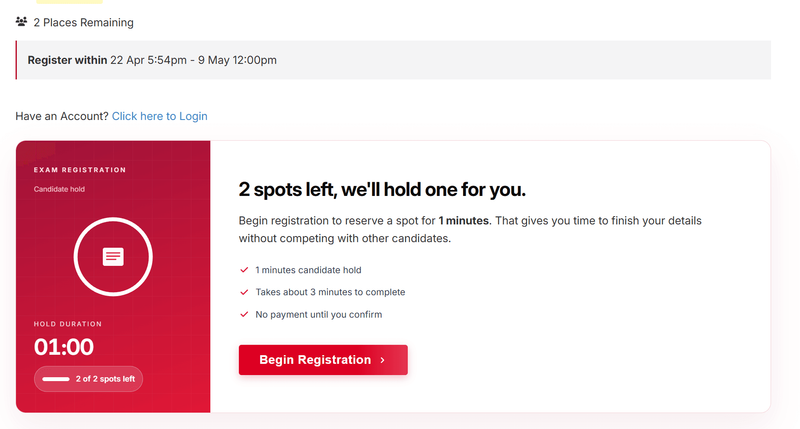
Configure the Hold Duration in your exam ordering settings to control how long a spot is held when a candidate clicks 'Begin
Registration'. Active holds count against exam capacity, ensuring no spot is double-booked.
 Candidates see
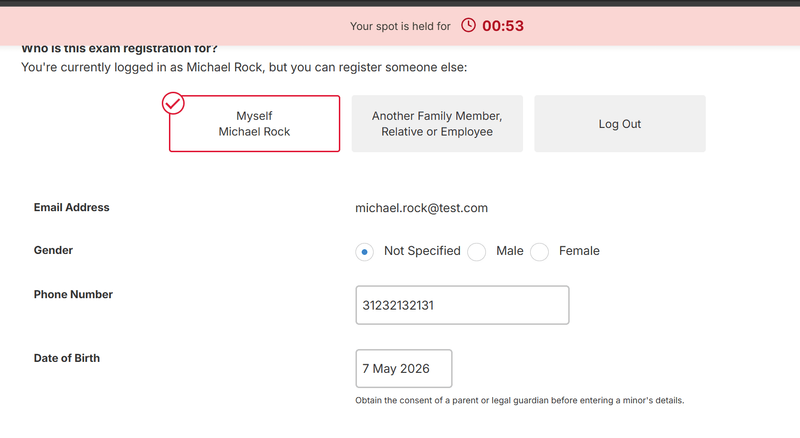
clear messaging about how long their spot is held, with a countdown timer that keeps them informed throughout the registration process.
Candidates see
clear messaging about how long their spot is held, with a countdown timer that keeps them informed throughout the registration process.
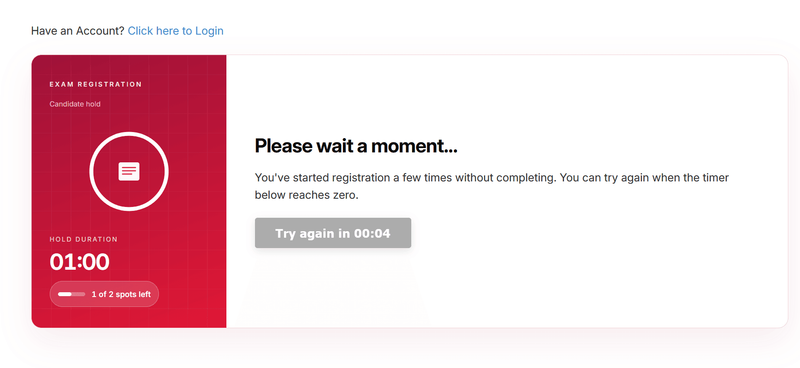
 After the 4th time
a user clicks “Begin Registration” without completing and submitting the form, a backoff timer will be displayed before they can attempt to
start the registration process again. This measure is intended to help prevent spam, automated abuse, and repeated incomplete submissions
while maintaining system stability and fair usage.
After the 4th time
a user clicks “Begin Registration” without completing and submitting the form, a backoff timer will be displayed before they can attempt to
start the registration process again. This measure is intended to help prevent spam, automated abuse, and repeated incomplete submissions
while maintaining system stability and fair usage.
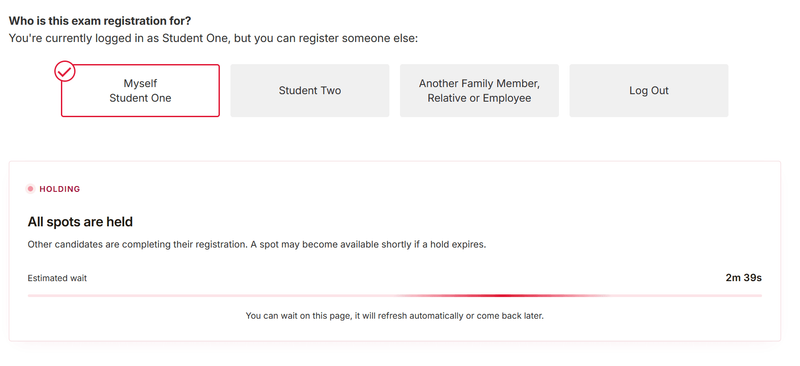
 When all spots are
temporarily held by other candidates, a holding queue with an estimated wait time is shown in the order page and in the exam selector, so
candidates know to wait rather than abandoning the registration.
When all spots are
temporarily held by other candidates, a holding queue with an estimated wait time is shown in the order page and in the exam selector, so
candidates know to wait rather than abandoning the registration.
Auto-Deletion for Sensitive Custom Field Data
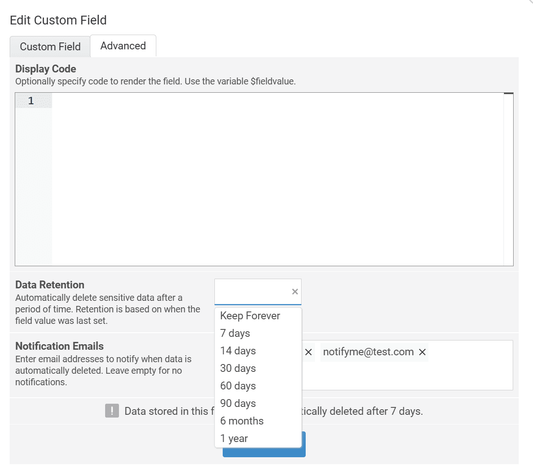 Custom
Fields now support automatic data retention policies, allowing you to securely collect sensitive information like passport numbers,
identification documents, and other personal data and have it automatically deleted after a configurable retention period.
Custom
Fields now support automatic data retention policies, allowing you to securely collect sensitive information like passport numbers,
identification documents, and other personal data and have it automatically deleted after a configurable retention period.
Choose from preset retention periods (7 days, 14 days, 30 days, 60 days, 90 days, 6 months, or 1 year) based on when the field value was last set. You can also configure notification emails to be sent when data is automatically deleted, ensuring full visibility of the retention process.
This feature helps you meet privacy compliance requirements while reducing the risk of holding sensitive data longer than necessary.